
Apps for Open Atrium: Atrium Folders
Apps for Open Atrium: Atrium Folders
Open Atrium's default set of features covers most of the common needs of an average organization, except one: a file repository with the familiar look and feel of a folders tree. By deploying customized versions of Open Atrium for different kinds of organizations we noticed that the built-in Notebook feature is still cumbersome for intranet users to store and categorize their documents (meeting reports, minutes, etc...): they are used to store their files in directories and subdirectories and not as books and child pages.
On the other hand, the needed technology for a more familiar documents repository is there: Drupal's core Book module can create hierarchical relations among nodes and files can be easily attached to nodes, so it's enough to interpret book pages as folders and their attachments as files to get the same paradigm users are familiar with.
Enter Atrium Folders: A simple file repository application
The idea behind Atrium Folders is to have a very simple file repository application with no external dependencies that users can just download, enable and start playing with. To get started, download the code directly from Nuvole's GitHub, place it under sites/all/modules/features in your Open Atrium installation and enable the new feature. Atrium Folders is shipped as an ordinary Drupal feature so, after enabling it as a module, we need to enable it in the Open Atrium group.

We can now visit the new Folders section and start adding the first folder.

As already mentioned, folders are nodes: we just need to specify its name, press Save and we are good to go. Now, say goodbye to the ordinary Drupal node interface; from now on we will be managing our repository from an intuitive "filesystem browser"-like interface:
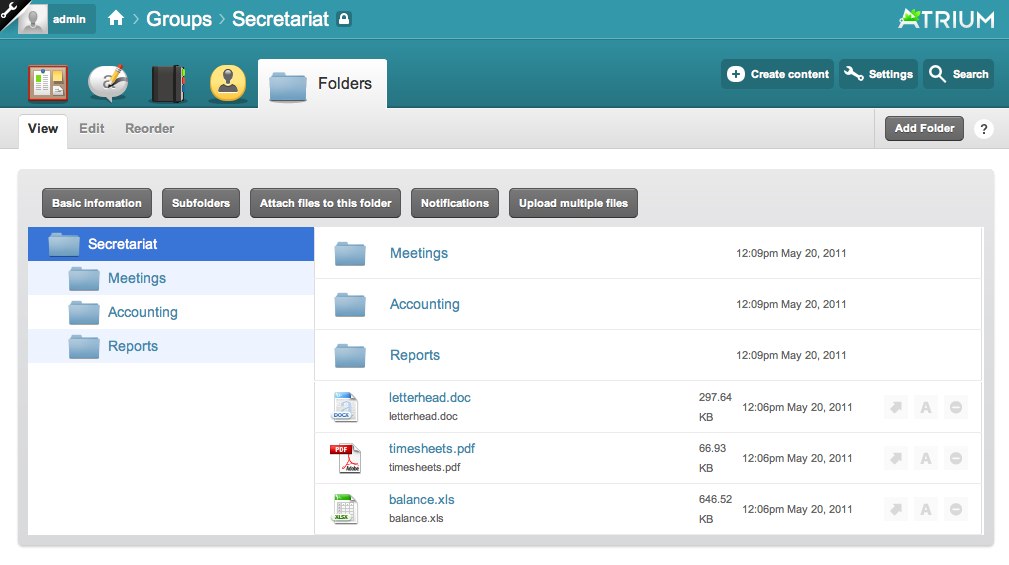
Managing your repository
Use the top menu to manage the folder currently being displayed; it contains the following four items.
Basic information: change name and description of the current folder:

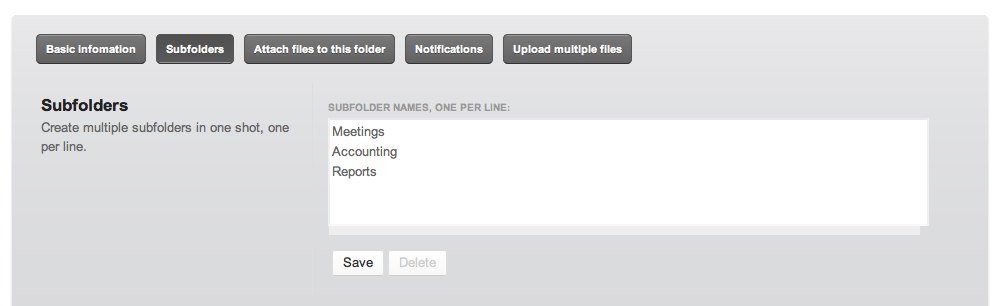
Subfolders: easily add a bunch of subfolders by entering their names, one per line:
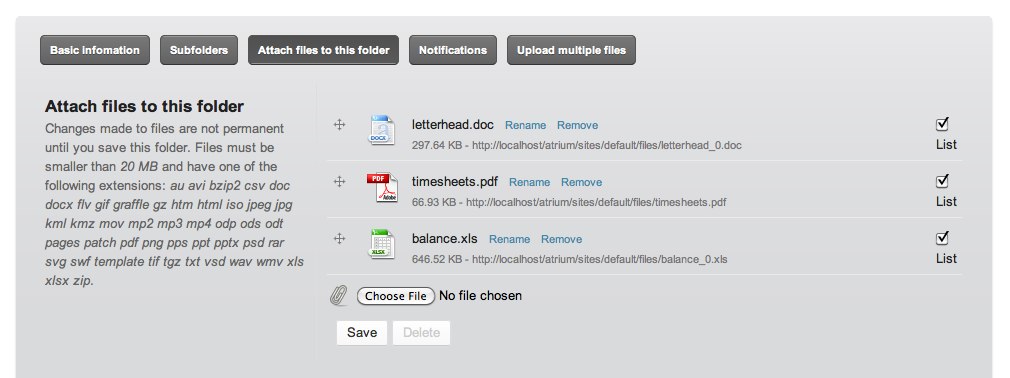
Attach files to this folder: just the reinterpretation of the good old Drupal file upload form, it gives the possibility to upload as many files as we need to the current folder:
Notifications: specify who will get a notification of the current changes (again, we don't reinvent the wheel but we integrate with the default Open Atrium notifications system):

Upload multiple files: quickly upload a ZIP archive containing several files and folders: Atrium Folders will unzip it for you and place its content in the current folder (PHP must have ZIP support enabled in order for this functionality to be available)

Rearranging folders
The Reorder tab allows to rearrange the structure of our repository by simple drag-and-drop. This handy interface, borrowed from Drupal's core Book module, is also very helpful when we have to rename several folders at once.

File toolbox
Each file has a toolbox that will allow to rename, move or delete the respective file. The toolbox uses jQuery and AJAX calls extensively, to guarantee a smooth user interaction: files will be modified and changes will take immediate effect, with no need to reload the page.
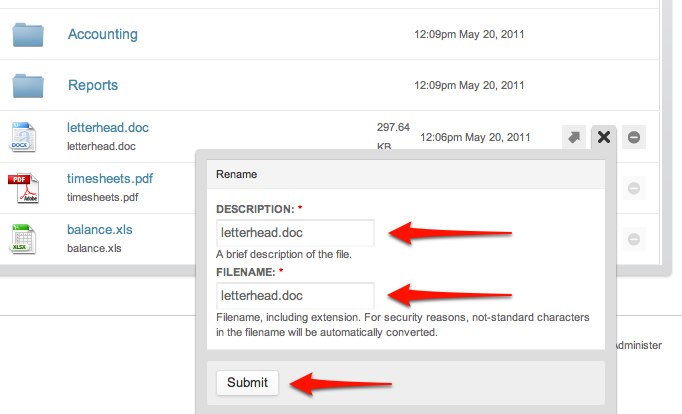
Creating your own toolbox
Atrium Folders exposes hook_folder_toolbox() to enable third party modules to expose their own toolbox. As an example, here is the default atrium_folders_folder_toolbox() implementation:
<?php


/**
 * Implementation of hook_folder_toolbox()
 */
function atrium_folders_folder_toolbox() {
  return array(
    array('op' => 'move',
      'type' => 'file',
      'title' => t('Move'),
      'description' => t('Move the file to another location.'),
      'form callback' => 'atrium_folders_move_file',
      'ajax callback' => 'atrium_folders_move_file_ajax_callback',
    ),
    ...
  );
}
?>
Drag and Drop Upload
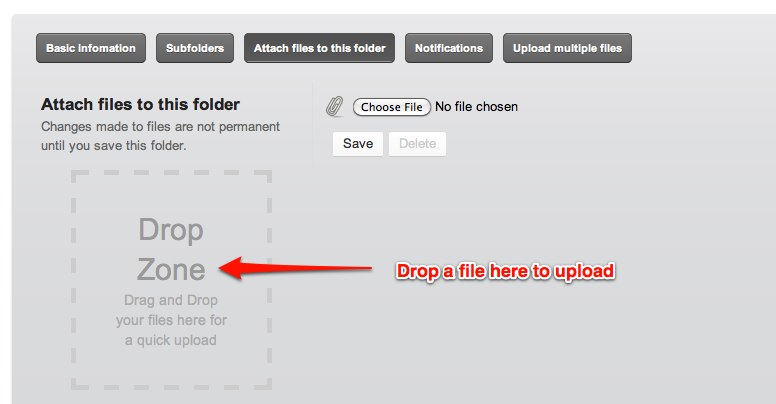
Atrium Folders ships with a built-in integration for the Drag'n'Drop Uploads module which gives the possibility to simply drag and drop files on the upload form to attach them to a node. If Drag'n'Drop Uploads module is enabled a Drop zone will be visible in the Attach files to this folder panel.
Drush integration: import an existing structure
When an organization wants to switch to Open Atrium, in most cases they need to migrate a shared folder to the new intranet. Atrium Folders includes the folder-import Drush command that allows to import a directory located in our local filesystem into a certain folder of a specific Open Atrium group. We just need to specify the full path of the directory we want to import and the Drupal path of the group we want it to be imported:
$ drush folder-import /tmp/meeting secretariat
Created 13 folders and 168 files.
Type $ drush help folder-import for more.
Comments
Comments
Fantastic/Finally!!! I love the way this is implemented...
Fantastic/Finally!!! I love the way this is implemented...
Fantastic/Finally!!! I love the way this is implemented...
This is a fantastic piece of work. I love how you've completely abstracted the UI stuff away from Nodes/Attachments into Folder/Files.
Scurries off to install on his OpenAtrium testbed
This is a fantastic piece of work. I love how you've completely abstracted the UI stuff away from Nodes/Attachments into Folder/Files.
Scurries off to install on his OpenAtrium testbed
This is a fantastic piece of work. I love how you've completely abstracted the UI stuff away from Nodes/Attachments into Folder/Files.
Scurries off to install on his OpenAtrium testbed
Looks great! I've used Outline Designer ( http://drupal.org/project/outline_designer ) to make the notebook feature a lot more user friendly. Looks like the rearrange folders feature could benefit from this project as well. Can't wait to throw it into my Atrium stack!
Looks great! I've used Outline Designer ( http://drupal.org/project/outline_designer ) to make the notebook feature a lot more user friendly. Looks like the rearrange folders feature could benefit from this project as well. Can't wait to throw it into my Atrium stack!
Looks great! I've used Outline Designer ( http://drupal.org/project/outline_designer ) to make the notebook feature a lot more user friendly. Looks like the rearrange folders feature could benefit from this project as well. Can't wait to throw it into my Atrium stack!
Whaw, this is great stuff guys. Looking forward to test it out !
Whaw, this is great stuff guys. Looking forward to test it out !
Whaw, this is great stuff guys. Looking forward to test it out !
Looks very interesting. One huge problem with traditional file folders - and with the Book module - is that content can only be displayed in one location. Will this allow me to have a single instance of the same content (file) exist in multiple folders (aka single sourcing)?
Looks very interesting. One huge problem with traditional file folders - and with the Book module - is that content can only be displayed in one location. Will this allow me to have a single instance of the same content (file) exist in multiple folders (aka single sourcing)?
Looks very interesting. One huge problem with traditional file folders - and with the Book module - is that content can only be displayed in one location. Will this allow me to have a single instance of the same content (file) exist in multiple folders (aka single sourcing)?
This cannot be done at the moment but could be interesting; it would require some planning though, since Drupal does not support it out of the box.
This cannot be done at the moment but could be interesting; it would require some planning though, since Drupal does not support it out of the box.
This cannot be done at the moment but could be interesting; it would require some planning though, since Drupal does not support it out of the box.
this module really alters the Open Atrium experience in my view, makes it far more usable
instead of a collapsing right hand nav for the notebook feature, you have intuitive, obvious folder structure
would be great if this became a general release module !
AWESOME
this module really alters the Open Atrium experience in my view, makes it far more usable
instead of a collapsing right hand nav for the notebook feature, you have intuitive, obvious folder structure
would be great if this became a general release module !
AWESOME
this module really alters the Open Atrium experience in my view, makes it far more usable
instead of a collapsing right hand nav for the notebook feature, you have intuitive, obvious folder structure
would be great if this became a general release module !
AWESOME
Nice, I installed it and it works flawlessly!
Nice, I installed it and it works flawlessly!
Nice, I installed it and it works flawlessly!
Very nice stuff!
Very nice stuff!
Very nice stuff!
Although this sounds great, did you consider building this on the filedepot project, which had a proof of concept several months ago for integration with OpenAtrium?
Although this sounds great, did you consider building this on the filedepot project, which had a proof of concept several months ago for integration with OpenAtrium?
Although this sounds great, did you consider building this on the filedepot project, which had a proof of concept several months ago for integration with OpenAtrium?
Atrium Folders actually grew out of work we started in 2009 for http://nuvole.org/case/european-youth-forum-intranet and it was more natural for us to complete that one instead of turning to FileDepot, but in other cases FileDepot can indeed be a valid option.
Atrium Folders actually grew out of work we started in 2009 for http://nuvole.org/case/european-youth-forum-intranet and it was more natural for us to complete that one instead of turning to FileDepot, but in other cases FileDepot can indeed be a valid option.
Atrium Folders actually grew out of work we started in 2009 for http://nuvole.org/case/european-youth-forum-intranet and it was more natural for us to complete that one instead of turning to FileDepot, but in other cases FileDepot can indeed be a valid option.
After I installed the feature I get an access denied page whenever I try to access a group that is public or private. Any suggestions?
After I installed the feature I get an access denied page whenever I try to access a group that is public or private. Any suggestions?
After I installed the feature I get an access denied page whenever I try to access a group that is public or private. Any suggestions?
There is a dedicated issue queue at https://github.com/nuvoleweb/atrium_folders for reporting any bugs and problems. Please post requests there, thank you!
There is a dedicated issue queue at https://github.com/nuvoleweb/atrium_folders for reporting any bugs and problems. Please post requests there, thank you!
There is a dedicated issue queue at https://github.com/nuvoleweb/atrium_folders for reporting any bugs and problems. Please post requests there, thank you!
Antonio, this is another great example of your firm's work on Atrium. We would definitely like to connect more on making it available to the larger Atrium community. Thank you for your innovation.
Jeff
Antonio, this is another great example of your firm's work on Atrium. We would definitely like to connect more on making it available to the larger Atrium community. Thank you for your innovation.
Jeff
Antonio, this is another great example of your firm's work on Atrium. We would definitely like to connect more on making it available to the larger Atrium community. Thank you for your innovation.
Jeff
This is a fantastic usecase for how apps/features should work for distributions like Open Atrium, Open Public, NodeStream etc. Really nice!
This is a fantastic usecase for how apps/features should work for distributions like Open Atrium, Open Public, NodeStream etc. Really nice!
This is a fantastic usecase for how apps/features should work for distributions like Open Atrium, Open Public, NodeStream etc. Really nice!
Great work! Thanks a lot!
I wished that this would become an official part of OpenAtrium and be the center of development for a while. Proper document management is sooo important.
Great work! Thanks a lot!
I wished that this would become an official part of OpenAtrium and be the center of development for a while. Proper document management is sooo important.
Great work! Thanks a lot!
I wished that this would become an official part of OpenAtrium and be the center of development for a while. Proper document management is sooo important.
What is great about this is how simple it achieves this result using the existing drupal node structure. It does attempt to overcomplicated document management. I am sure something like this will satisfy a large majority of cases that need some form of document management.
Well done.
What is great about this is how simple it achieves this result using the existing drupal node structure. It does attempt to overcomplicated document management. I am sure something like this will satisfy a large majority of cases that need some form of document management.
Well done.
What is great about this is how simple it achieves this result using the existing drupal node structure. It does attempt to overcomplicated document management. I am sure something like this will satisfy a large majority of cases that need some form of document management.
Well done.
Looks very nice! Looking forward to test it :)
Looks very nice! Looking forward to test it :)
Looks very nice! Looking forward to test it :)
The one thing I've needed in a file repo is meta data (CCK) on the files. Traditionally this isn't possible because of the node/attachments model.
Have you considered this? Is this possible with your toolbox hook?
Greg
The one thing I've needed in a file repo is meta data (CCK) on the files. Traditionally this isn't possible because of the node/attachments model.
Have you considered this? Is this possible with your toolbox hook?
Greg
The one thing I've needed in a file repo is meta data (CCK) on the files. Traditionally this isn't possible because of the node/attachments model.
Have you considered this? Is this possible with your toolbox hook?
Greg
This is not possible via interface or (easily) via API at the moment, but as explained in a comment above it could indeed be a nice extension, even though not trivial.
This is not possible via interface or (easily) via API at the moment, but as explained in a comment above it could indeed be a nice extension, even though not trivial.
This is not possible via interface or (easily) via API at the moment, but as explained in a comment above it could indeed be a nice extension, even though not trivial.
Thanks for the efforts. The interface looks pretty good. Although I see that this brings us back to the use of files, which collides with the existing cloud applications such as Google Docs. How could you and a colleague, for example, work on the same document in real time online?
Cheers
Thanks for the efforts. The interface looks pretty good. Although I see that this brings us back to the use of files, which collides with the existing cloud applications such as Google Docs. How could you and a colleague, for example, work on the same document in real time online?
Cheers
Thanks for the efforts. The interface looks pretty good. Although I see that this brings us back to the use of files, which collides with the existing cloud applications such as Google Docs. How could you and a colleague, for example, work on the same document in real time online?
Cheers
Beating Google Docs, or competing with it, is not the aim. Atrium Folders is a simple file repository feature for those who want to share files and folders.
Beating Google Docs, or competing with it, is not the aim. Atrium Folders is a simple file repository feature for those who want to share files and folders.
Beating Google Docs, or competing with it, is not the aim. Atrium Folders is a simple file repository feature for those who want to share files and folders.
Google doc is great and unbeatable when privacy is least important. When you want to maintain confidential documents, native solution is preferred. Third party services potentially fails in this area.
And it didn't claim anywhere to provide collaborative editing feature :P
Google doc is great and unbeatable when privacy is least important. When you want to maintain confidential documents, native solution is preferred. Third party services potentially fails in this area.
And it didn't claim anywhere to provide collaborative editing feature :P
Google doc is great and unbeatable when privacy is least important. When you want to maintain confidential documents, native solution is preferred. Third party services potentially fails in this area.
And it didn't claim anywhere to provide collaborative editing feature :P
How to beat google worksheet ?
Building a module with this jquery plug-in : http://visop-dev.com/lib/jquery/jquery.sheet/jquery.sheet.html
How to beat google worksheet ?
Building a module with this jquery plug-in : http://visop-dev.com/lib/jquery/jquery.sheet/jquery.sheet.html
How to beat google worksheet ?
Building a module with this jquery plug-in : http://visop-dev.com/lib/jquery/jquery.sheet/jquery.sheet.html
It looks really great.
Thanks.
It looks really great.
Thanks.
It looks really great.
Thanks.
Very, very good job Very good intuition
Do you considered to use pupload module to allow upload multiple files in one shot ?
Very, very good job Very good intuition
Do you considered to use pupload module to allow upload multiple files in one shot ?
Very, very good job Very good intuition
Do you considered to use pupload module to allow upload multiple files in one shot ?
I really wanted this module and I love it.But I need additional feature that set permission to edit/delete uploaded files.Now, Uploaded files can be edit/delete any user who can view the files.
I really wanted this module and I love it.But I need additional feature that set permission to edit/delete uploaded files.Now, Uploaded files can be edit/delete any user who can view the files.
I really wanted this module and I love it.But I need additional feature that set permission to edit/delete uploaded files.Now, Uploaded files can be edit/delete any user who can view the files.
I uploaded a pdf-file, double clicked on it in the Atrium folder and it opens in the whole window, but I loose the Atrium meny system. I need to click go-back arrow in the Internetbrowser. I would prefer if it opened in a blank-page or in an iframe.
I uploaded a pdf-file, double clicked on it in the Atrium folder and it opens in the whole window, but I loose the Atrium meny system. I need to click go-back arrow in the Internetbrowser. I would prefer if it opened in a blank-page or in an iframe.
I uploaded a pdf-file, double clicked on it in the Atrium folder and it opens in the whole window, but I loose the Atrium meny system. I need to click go-back arrow in the Internetbrowser. I would prefer if it opened in a blank-page or in an iframe.
How hard would it be for us to port this to Drupal Commons?
How hard would it be for us to port this to Drupal Commons?
How hard would it be for us to port this to Drupal Commons?
It could also use a checkout flag so that only one person can work on a file at a time, or atlease tell other that they are working on it / possibly with the user name too...
It could also use a checkout flag so that only one person can work on a file at a time, or atlease tell other that they are working on it / possibly with the user name too...
It could also use a checkout flag so that only one person can work on a file at a time, or atlease tell other that they are working on it / possibly with the user name too...
Awesome addition. Was wondering if there was any way, other than public or private groups, of controlling access to the files or folders? Thanks.
Awesome addition. Was wondering if there was any way, other than public or private groups, of controlling access to the files or folders? Thanks.
Awesome addition. Was wondering if there was any way, other than public or private groups, of controlling access to the files or folders? Thanks.
This was the only thing stopping me from using Atrium for our intranet! Great, great work!
Is it possible to increase the upload limit from 20Mb?
Also, the progress bar doesn't give real time progress on file upload... just a pretty animation. Perhaps consideration for a future release? That would make this pretty near perfect in my opinion! Thanks so much!!!
This was the only thing stopping me from using Atrium for our intranet! Great, great work!
Is it possible to increase the upload limit from 20Mb?
Also, the progress bar doesn't give real time progress on file upload... just a pretty animation. Perhaps consideration for a future release? That would make this pretty near perfect in my opinion! Thanks so much!!!
This was the only thing stopping me from using Atrium for our intranet! Great, great work!
Is it possible to increase the upload limit from 20Mb?
Also, the progress bar doesn't give real time progress on file upload... just a pretty animation. Perhaps consideration for a future release? That would make this pretty near perfect in my opinion! Thanks so much!!!
Upload limit and upload progress bar must be configured or reconfigured in your Open Atrium / Drupal setup. You can ask for support in the Drupal forums if you don't know how to enable these.
Upload limit and upload progress bar must be configured or reconfigured in your Open Atrium / Drupal setup. You can ask for support in the Drupal forums if you don't know how to enable these.
Upload limit and upload progress bar must be configured or reconfigured in your Open Atrium / Drupal setup. You can ask for support in the Drupal forums if you don't know how to enable these.
That's exactly what I did and it now the upload progress bar works perfectly! For those experiencing similar problems...
First go to /admin/reports/status in your atrium install. Scroll down to the bottom of the page and check to see if 'Upload Progress' is working. If it isn't you'll see a notice that you need to install a PHP module to get the upload progress working (to be clear, this is a module that simply allows you to 'see' the progress of a file upload in the progress bar, it doesn't affect the ability to upload files).
To fix all you need to do is to install the PECL Upload Progress library for PHP. I had my host do this and now works just fine.
Great work and thanks for the tip!
That's exactly what I did and it now the upload progress bar works perfectly! For those experiencing similar problems...
First go to /admin/reports/status in your atrium install. Scroll down to the bottom of the page and check to see if 'Upload Progress' is working. If it isn't you'll see a notice that you need to install a PHP module to get the upload progress working (to be clear, this is a module that simply allows you to 'see' the progress of a file upload in the progress bar, it doesn't affect the ability to upload files).
To fix all you need to do is to install the PECL Upload Progress library for PHP. I had my host do this and now works just fine.
Great work and thanks for the tip!
That's exactly what I did and it now the upload progress bar works perfectly! For those experiencing similar problems...
First go to /admin/reports/status in your atrium install. Scroll down to the bottom of the page and check to see if 'Upload Progress' is working. If it isn't you'll see a notice that you need to install a PHP module to get the upload progress working (to be clear, this is a module that simply allows you to 'see' the progress of a file upload in the progress bar, it doesn't affect the ability to upload files).
To fix all you need to do is to install the PECL Upload Progress library for PHP. I had my host do this and now works just fine.
Great work and thanks for the tip!
Hi: I just installed the latest OA. (Beta10). I added the Folders code to the appropriate directory but it doesn't show up in the features list. Should it be in a different location? Cheers, Dave
Hi: I just installed the latest OA. (Beta10). I added the Folders code to the appropriate directory but it doesn't show up in the features list. Should it be in a different location? Cheers, Dave
Hi: I just installed the latest OA. (Beta10). I added the Folders code to the appropriate directory but it doesn't show up in the features list. Should it be in a different location? Cheers, Dave
Hi Dave,
Can you confirm that the sites are in the following directory...
/sites/all/modules/dragndrop_uploads/I had to create my
modulesdirectory inside thealldirectory when I installed.Hi Dave,
Can you confirm that the sites are in the following directory...
/sites/all/modules/dragndrop_uploads/I had to create my
modulesdirectory inside thealldirectory when I installed.Hi Dave,
Can you confirm that the sites are in the following directory...
/sites/all/modules/dragndrop_uploads/I had to create my
modulesdirectory inside thealldirectory when I installed.Sorry Dave, when I said 'sites' I meant to say 'files'! :D
Sorry Dave, when I said 'sites' I meant to say 'files'! :D
Sorry Dave, when I said 'sites' I meant to say 'files'! :D
I didn't have that particular directory - "sites/all/modules/dragndrop_uploads" but I created it and still couldn't see the folder add-on in the features list. I'm a noob so do I drop the .zip archive in there or all the extracted files? In general, how do I add new modules to OA (Beta10)? Thanks for the help BTW...
Cheers, Dave
I didn't have that particular directory - "sites/all/modules/dragndrop_uploads" but I created it and still couldn't see the folder add-on in the features list. I'm a noob so do I drop the .zip archive in there or all the extracted files? In general, how do I add new modules to OA (Beta10)? Thanks for the help BTW...
Cheers, Dave
I didn't have that particular directory - "sites/all/modules/dragndrop_uploads" but I created it and still couldn't see the folder add-on in the features list. I'm a noob so do I drop the .zip archive in there or all the extracted files? In general, how do I add new modules to OA (Beta10)? Thanks for the help BTW...
Cheers, Dave
Each module has its own folder under sites/all/modules/example_module. Drop all the extracted files into this folder. Go to Admin -> Site Building -> Modules and enable the modules. Alternately if you have shell access: - First install drush (this is the Drupal shell and will save you LOTS of time installing and enabling modules). Note that drush is not a Drupal module, but a Unix/Linux utility that needs to be installed outside Drupal. - At the command prompt: $ drush dl example_module - Enable the module using: $ drush en example_module
Each module has its own folder under sites/all/modules/example_module. Drop all the extracted files into this folder. Go to Admin -> Site Building -> Modules and enable the modules. Alternately if you have shell access: - First install drush (this is the Drupal shell and will save you LOTS of time installing and enabling modules). Note that drush is not a Drupal module, but a Unix/Linux utility that needs to be installed outside Drupal. - At the command prompt: $ drush dl example_module - Enable the module using: $ drush en example_module
Each module has its own folder under sites/all/modules/example_module. Drop all the extracted files into this folder. Go to Admin -> Site Building -> Modules and enable the modules. Alternately if you have shell access: - First install drush (this is the Drupal shell and will save you LOTS of time installing and enabling modules). Note that drush is not a Drupal module, but a Unix/Linux utility that needs to be installed outside Drupal. - At the command prompt: $ drush dl example_module - Enable the module using: $ drush en example_module
Hi Prodosh:
Thanks for the tips. I installed drush then got the following message when trying to install the folders module:
root@gridworkz01:/var/www/gwz/sites/all/modules# drush dl folders_module PHP Deprecated: Comments starting with '#' are deprecated in /etc/php5/cli/conf.d/imap.ini on line 1 in Unknown on line 0 No release history was found for the requested project [error] (folders_module). An error occurred at function : drush_pm_dl [error]
I'm using Ubuntu Desktop 10.04 and did: apt-get install drush
Cheers, Dave
Hi Prodosh:
Thanks for the tips. I installed drush then got the following message when trying to install the folders module:
root@gridworkz01:/var/www/gwz/sites/all/modules# drush dl folders_module PHP Deprecated: Comments starting with '#' are deprecated in /etc/php5/cli/conf.d/imap.ini on line 1 in Unknown on line 0 No release history was found for the requested project [error] (folders_module). An error occurred at function : drush_pm_dl [error]
I'm using Ubuntu Desktop 10.04 and did: apt-get install drush
Cheers, Dave
Hi Prodosh:
Thanks for the tips. I installed drush then got the following message when trying to install the folders module:
root@gridworkz01:/var/www/gwz/sites/all/modules# drush dl folders_module PHP Deprecated: Comments starting with '#' are deprecated in /etc/php5/cli/conf.d/imap.ini on line 1 in Unknown on line 0 No release history was found for the requested project [error] (folders_module). An error occurred at function : drush_pm_dl [error]
I'm using Ubuntu Desktop 10.04 and did: apt-get install drush
Cheers, Dave
No problems now, I did a drush update and installed folders from the Web interface. Thanks for the help, I really appreciate it. Cheers, Dave
No problems now, I did a drush update and installed folders from the Web interface. Thanks for the help, I really appreciate it. Cheers, Dave
No problems now, I did a drush update and installed folders from the Web interface. Thanks for the help, I really appreciate it. Cheers, Dave
Just wanted to say thanks for the great add on. We have tried to use open atrium a few times and found it lacking. Having this feature as well as http://druplicity.com/content/open-atrium-time-tracking make for a more robust platform.
Regards, Mark
Just wanted to say thanks for the great add on. We have tried to use open atrium a few times and found it lacking. Having this feature as well as http://druplicity.com/content/open-atrium-time-tracking make for a more robust platform.
Regards, Mark
Just wanted to say thanks for the great add on. We have tried to use open atrium a few times and found it lacking. Having this feature as well as http://druplicity.com/content/open-atrium-time-tracking make for a more robust platform.
Regards, Mark
Great! All we need now is file revisions and better (longer file descriptions). Something like Filedepot Feature -only without bugs!
Great! All we need now is file revisions and better (longer file descriptions). Something like Filedepot Feature -only without bugs!
Great! All we need now is file revisions and better (longer file descriptions). Something like Filedepot Feature -only without bugs!
Fantastic feature for atrium. Perfect work.
Regards, Maik
Fantastic feature for atrium. Perfect work.
Regards, Maik
Fantastic feature for atrium. Perfect work.
Regards, Maik
Just curious, does anyone know why the filefield module isn't used in Open Atrium or Atrium Folders?
Just curious, does anyone know why the filefield module isn't used in Open Atrium or Atrium Folders?
Just curious, does anyone know why the filefield module isn't used in Open Atrium or Atrium Folders?
All is working perfectly with the exception of the "Submit" button missing on all the hook menu items. Can anyone advise?
All is working perfectly with the exception of the "Submit" button missing on all the hook menu items. Can anyone advise?
All is working perfectly with the exception of the "Submit" button missing on all the hook menu items. Can anyone advise?
Excellent feature, thanks!
Excellent feature, thanks!
Excellent feature, thanks!
First, thanks for your great feature. It makes Open Atrium a lot more useful.
Unfortunately I had to enable the jQuery Update user interface module to fix an Open Atrium Dashboard problem. Enabling this broke the "Submit" menu on the hook menu items.
I took a look at your module code, but couldn't find anything obvious.
Thanks again.
First, thanks for your great feature. It makes Open Atrium a lot more useful.
Unfortunately I had to enable the jQuery Update user interface module to fix an Open Atrium Dashboard problem. Enabling this broke the "Submit" menu on the hook menu items.
I took a look at your module code, but couldn't find anything obvious.
Thanks again.
First, thanks for your great feature. It makes Open Atrium a lot more useful.
Unfortunately I had to enable the jQuery Update user interface module to fix an Open Atrium Dashboard problem. Enabling this broke the "Submit" menu on the hook menu items.
I took a look at your module code, but couldn't find anything obvious.
Thanks again.
This is very well implemented! And a much needed feature!
I'm disappointed this model doesn't support file revisions (because it uses Attachments).
Perhaps in a future release one could build in using FileFields give more thought to node revisions.
Keeping revisions of files uploaded is a main requirement of a document management system. Looking forward to using this in the future.
This is very well implemented! And a much needed feature!
I'm disappointed this model doesn't support file revisions (because it uses Attachments).
Perhaps in a future release one could build in using FileFields give more thought to node revisions.
Keeping revisions of files uploaded is a main requirement of a document management system. Looking forward to using this in the future.
This is very well implemented! And a much needed feature!
I'm disappointed this model doesn't support file revisions (because it uses Attachments).
Perhaps in a future release one could build in using FileFields give more thought to node revisions.
Keeping revisions of files uploaded is a main requirement of a document management system. Looking forward to using this in the future.
This exactly what I was looking for. Thank you for this.
I've run into an issue. When deleting files, the module shows a confirmation pop-up but the "OK" and "CANCEL" buttons are missing.
Hmmmm... is this a real issue or have I omitted a setting?
Antonio
This exactly what I was looking for. Thank you for this.
I've run into an issue. When deleting files, the module shows a confirmation pop-up but the "OK" and "CANCEL" buttons are missing.
Hmmmm... is this a real issue or have I omitted a setting?
Antonio
This exactly what I was looking for. Thank you for this.
I've run into an issue. When deleting files, the module shows a confirmation pop-up but the "OK" and "CANCEL" buttons are missing.
Hmmmm... is this a real issue or have I omitted a setting?
Antonio
Yes I also have no submit/cancel buttons when I click on one of the hook menu buttons.
Yes I also have no submit/cancel buttons when I click on one of the hook menu buttons.
Yes I also have no submit/cancel buttons when I click on one of the hook menu buttons.
My "OK" and "Cancel" buttons are missing, too (I think that's what they're called, but I'm not sure because I can't see them). I also applied that jQuery update.
Can you please advise on how to restore these buttons? As of now, I cannot rename Folder files and I cannot delete them, either. Thanks.
My "OK" and "Cancel" buttons are missing, too (I think that's what they're called, but I'm not sure because I can't see them). I also applied that jQuery update.
Can you please advise on how to restore these buttons? As of now, I cannot rename Folder files and I cannot delete them, either. Thanks.
My "OK" and "Cancel" buttons are missing, too (I think that's what they're called, but I'm not sure because I can't see them). I also applied that jQuery update.
Can you please advise on how to restore these buttons? As of now, I cannot rename Folder files and I cannot delete them, either. Thanks.
This is a great tool and we are experimenting with Atrium at our university. This tool is great. Quick question. How do you enable submit buttons for the file toolbox when deleting, editing info or moving to other folders?
I cant seem to find find that in the features or content types settings. Thanks for the help!!
This is a great tool and we are experimenting with Atrium at our university. This tool is great. Quick question. How do you enable submit buttons for the file toolbox when deleting, editing info or moving to other folders?
I cant seem to find find that in the features or content types settings. Thanks for the help!!
This is a great tool and we are experimenting with Atrium at our university. This tool is great. Quick question. How do you enable submit buttons for the file toolbox when deleting, editing info or moving to other folders?
I cant seem to find find that in the features or content types settings. Thanks for the help!!
I have a problem with delete files in File toolbox. When I click on the delete icon then pop up the dialog box but it doesn't have button to delete.
Thanks a lot!
I have a problem with delete files in File toolbox. When I click on the delete icon then pop up the dialog box but it doesn't have button to delete.
Thanks a lot!
I have a problem with delete files in File toolbox. When I click on the delete icon then pop up the dialog box but it doesn't have button to delete.
Thanks a lot!
Any plans to add tagging and category features to a file upload?
Any plans to add tagging and category features to a file upload?
Any plans to add tagging and category features to a file upload?
Hi Antonio,
As mentioned before, the OK and CANCEL buttons are missing. Please advise if there is a way to solve this.
Thank you in advance, Antonio
Hi Antonio,
As mentioned before, the OK and CANCEL buttons are missing. Please advise if there is a way to solve this.
Thank you in advance, Antonio
Hi Antonio,
As mentioned before, the OK and CANCEL buttons are missing. Please advise if there is a way to solve this.
Thank you in advance, Antonio
Comments are closed. Please use the issue queue on Github for reporting bugs, and if you need custom development on Atrium Folders feel free to contact us through the contact form on this site.
Comments are closed. Please use the issue queue on Github for reporting bugs, and if you need custom development on Atrium Folders feel free to contact us through the contact form on this site.
Comments are closed. Please use the issue queue on Github for reporting bugs, and if you need custom development on Atrium Folders feel free to contact us through the contact form on this site.